Submitting an Image
This page describes how to add an image to GeologyRocks and earn yourself some points in the process! Please check our terms and conditions before submitting. Submitting an image means you agree to these. To add an image to GeologyRocks you must be a member of the site. You can sign in a register using the form on the left of the page.

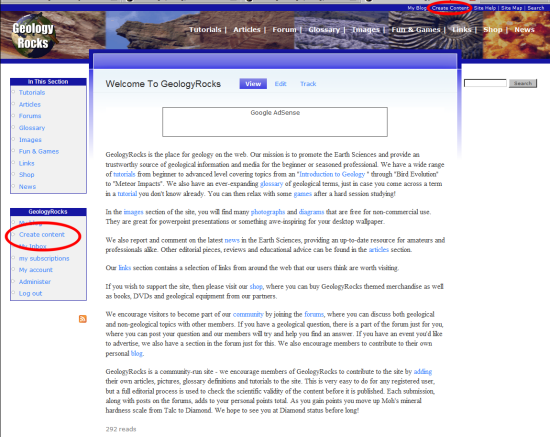
Once signed in, click on either "Create content" links available on any page.
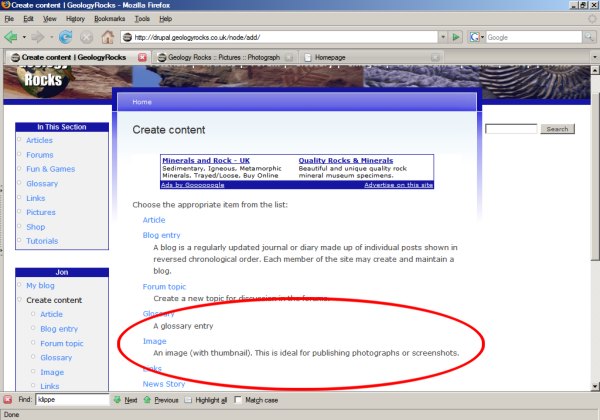
When you click on this link, you will be presented with a list of content types you can create. Click "Image".
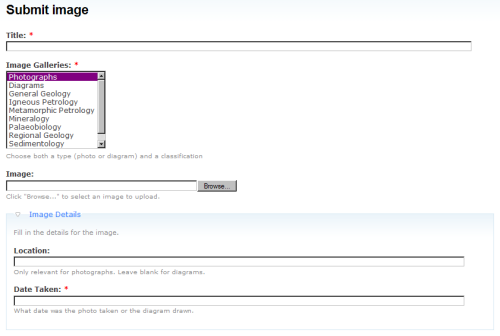
Fill in the form that is presented. The first part of the form requires the title (a very short description of the image), the image location and a classification. the image should reside on your harddrive. Click "Browse" to locate the image. The classification should have at least two entries. Press the "Ctrl" key while selecting to select multiple entries. One of the entries should be either "Photographs" or "Diagram". There should also be at least one of the other classification types, but there may be multilpe entries here. For example; a photograph of a trace fossil should be classified as "Photographs", "Palaeobiology" and possibly "Sedimentology". The form also has space for where the images was taken (for photographs) and a date. The date should be written as dd-mm-yyy.
The next part of the form (Body) is a description of the image. Feel free to add links to other parts of the site, such as glosary terms, etc, using the built in editor. Finally, you can add any notes for editors (e.g. if this entry is only partially complete) and subscribe to the node. If you do this, you will receive an email when a new comment is added.

You can then click "Preview" button. If everything looks OK, click "Submit". This will place your content in the moderation queue for our editors to check. When you have submitted the content you will recieve the appropriate number of points. If the image is not accepted, the points will be removed. Thanks for submitting!
Forums Latest
Latest image